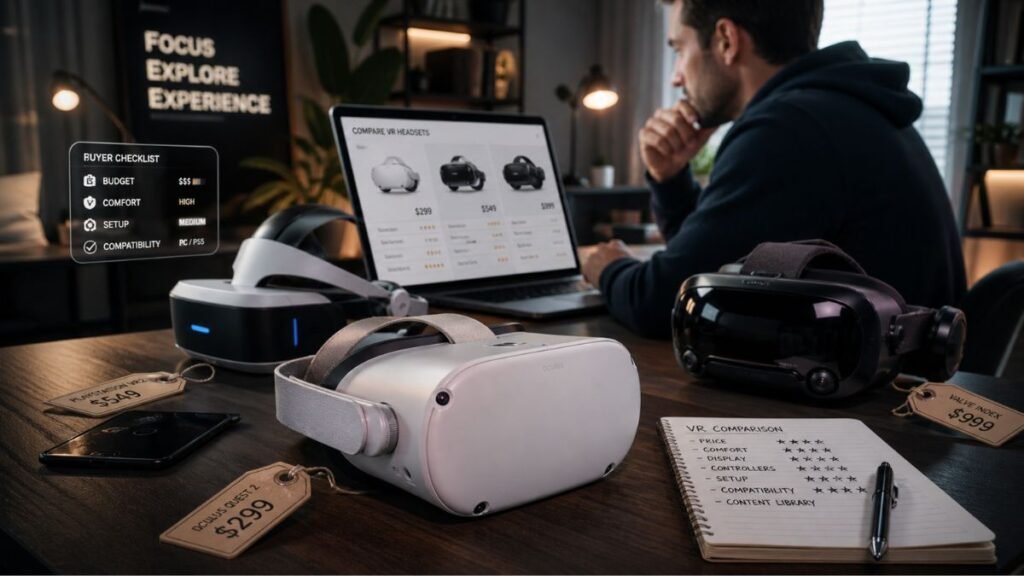
VR Buying Mistakes in 2026: 8 Expensive Errors Beginners Must Avoid
VR buying mistakes happen fast in 2026 because the headset market looks simple at first but becomes confusing once you compare lenses, comfort, tracking, battery life, PCVR, accessories, and hidden ownership costs.
Buying your first VR headset should feel exciting.
But for many beginners, it turns into a wall of confusing terms.
You see words like:
- IPD
- FOV
- Pancake lenses
- Fresnel lenses
- 120Hz refresh rate
- Passthrough
- PCVR
- Wi-Fi 6E
- Foveated rendering
You do not want an engineering lesson.
You want a headset that works, feels comfortable, looks clear, and does not end up collecting dust after three weeks.
That is where most beginners get trapped.
They buy the cheapest headset, ignore comfort, misunderstand motion sickness, or forget the extra accessories needed to make VR enjoyable.
The biggest problem is not buying a bad headset.
The biggest problem is buying the wrong headset for your space, body, budget, and use case.
This guide breaks down the most common VR buying mistakes beginners make in 2026, then shows you what to do instead.
By the end, you will know how to avoid buyer’s remorse and choose a VR setup you will actually use.
Why Beginners Regret Their First VR Headset
Most VR regret comes from friction.
Friction means anything that makes VR harder to use.
Examples include:
- The headset hurts your face
- The image looks blurry
- You feel motion sick
- Your room is too small
- The battery dies too fast
- Your Wi-Fi ruins PCVR streaming
- You need more accessories than expected
- The games do not match what you thought VR would be
Many people buy during the excitement phase.
Then reality hits.
They must charge controllers, clear space, adjust straps, update software, manage boundaries, and learn comfort settings.
That does not mean VR is bad.
It means VR rewards smart buying.
A good VR purchase starts before checkout.
Pre-Purchase Environment Audit: Is Your Space Ready for VR?
Before choosing a headset, check your room.
This step saves money.
It also prevents frustration.
Check Your Play Space
You do not need a huge room.
But you do need safe movement.
Ask yourself:
- Can I stand with arms fully extended?
- Do I have furniture nearby?
- Is there a TV or monitor within punching distance?
- Can pets or kids walk into the area?
- Do I have enough seated space for slower games?
A common beginner mistake is buying a headset before checking the real-world play area.
If setup feels annoying every time, you will use VR less.
What To Do Instead
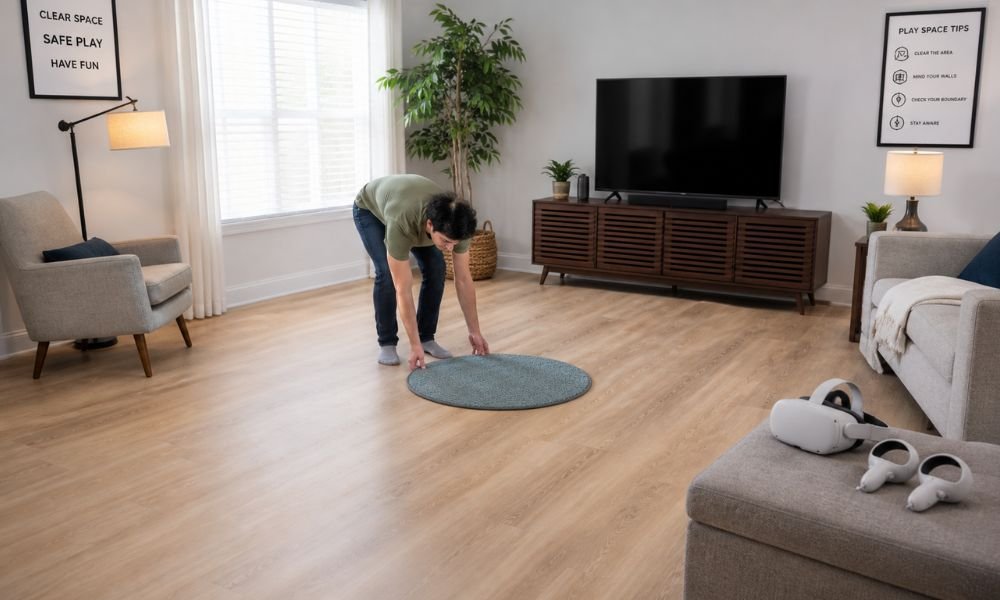
Use the small carpet trick.
Place a small rug or mat in the centre of your play area.
When your feet leave the mat, you know you are drifting too close to furniture.
This gives your body a physical anchor without relying only on the digital boundary.
Check Your Lighting
Most standalone headsets use inside-out tracking.
That means headset cameras track your room.
If the room is too dark, tracking can fail.
Poor tracking creates:
- Floating hands
- Shaky movement
- Controller drift
- Nausea
- Game stutter
What To Do Instead
Use even lighting.
Avoid pitch-black rooms.
If you want to play at night without bright lights, consider an infrared light. It gives headset cameras something to track while keeping the room dark to your eyes.
The 8 Expensive VR Buying Mistakes to Avoid
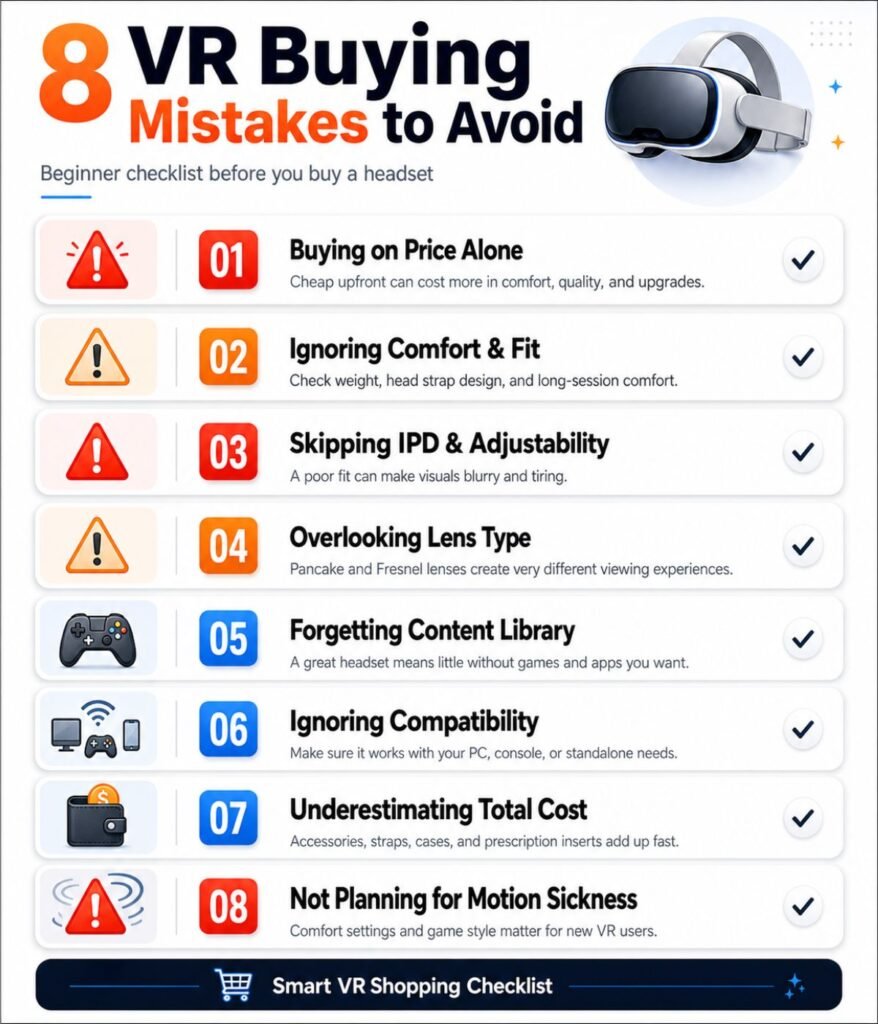
Each mistake below follows the same pattern:
Problem first.
Then the smarter move.
That way, you do not only know what went wrong.
You know what to do next.
Mistake 1: Buying Based Only on Price
Cheap VR can become expensive fast.
Many beginners choose the lowest price because they want to “test VR.”
That makes sense.
But the cheapest headset is not always the best value.
Lower-cost headsets often include:
- Older lenses
- Weaker comfort
- Limited IPD adjustment
- Short battery life
- Smaller app support
- More accessory needs
A $299 headset can quickly become a $400 to $450 setup after adding a better strap, battery pack, facial interface, and case.
What To Do Instead
Buy based on use case.
Ask:
- Am I using VR for gaming?
- Fitness?
- PCVR?
- Movies?
- Family use?
- Productivity?
If you only want casual VR, a Quest 3S may be enough.
If you plan to use VR weekly, Quest 3 may save frustration because of better lenses and comfort.
Value is not the lowest price.
Value is the headset you keep using.
Mistake 2: Ignoring Lens Technology
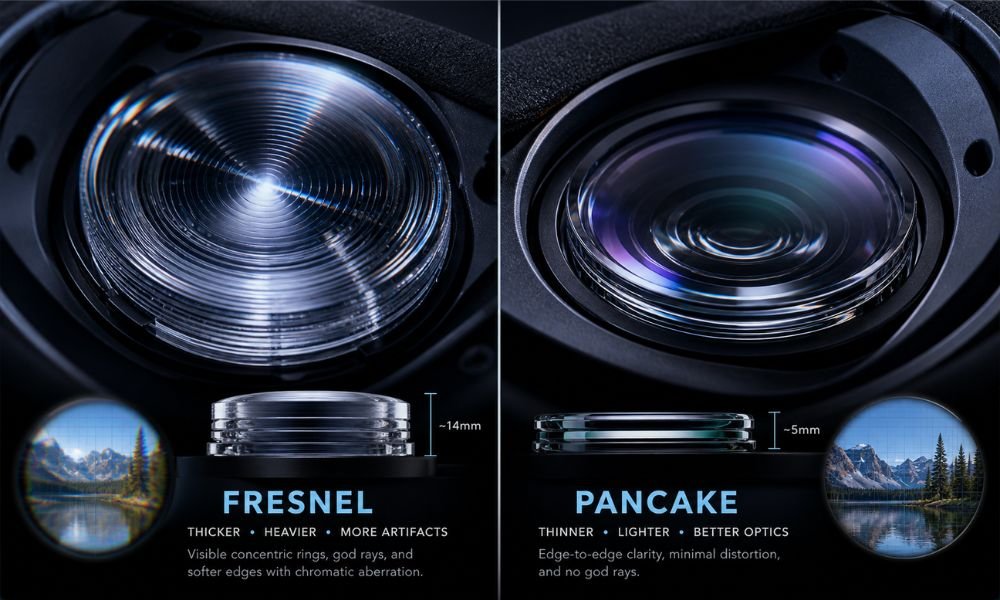
Lens technology changes everything.
Many beginners compare resolution first.
That is incomplete.
Resolution tells you how many pixels the headset has.
Lenses decide how clearly those pixels reach your eyes.
In 2026, most VR lenses fall into two groups:
- Fresnel lenses
- Pancake lenses
Fresnel Lenses
Fresnel lenses are older and cheaper.
They can still work well.
But they often create:
- Blurry edges
- God rays around bright text
- A small sweet spot
- More headset adjustment
- More eye fatigue
Pancake Lenses
Pancake lenses are newer and clearer.
They help with:
- Edge-to-edge clarity
- Less glare
- Thinner headset design
- Better text readability
- Less visual frustration
Think of Fresnel lenses like looking through a small clear circle in the centre of a window.
Think of pancake lenses like having more of the window stay clear.
What To Do Instead
Prioritize pancake lenses if your budget allows.
Quest 3 is stronger than Quest 3S for this reason.
Quest 3S has modern power but older Fresnel optics.
That does not make it bad.
It makes it a compromise.
Mistake 3: Misunderstanding IPD
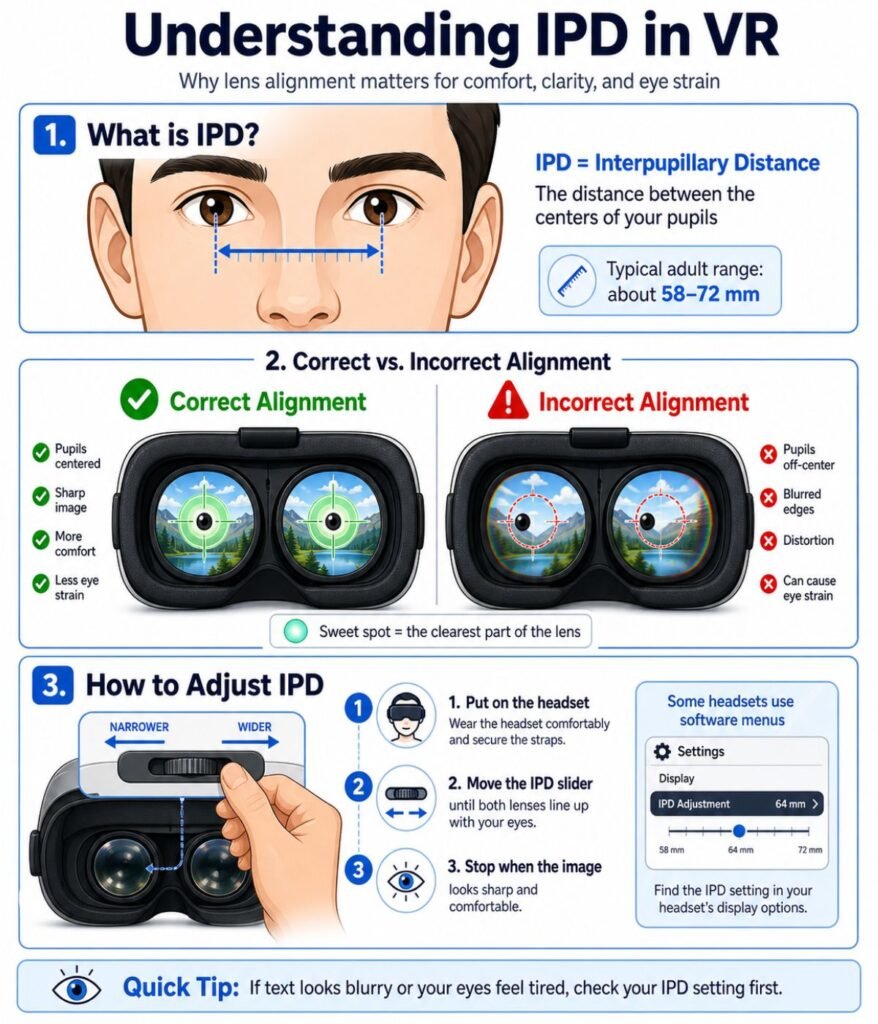
IPD means interpupillary distance.
That is the distance between your pupils.
If the headset lenses do not line up with your eyes, VR can feel blurry even when the headset is working correctly.
Wrong IPD can cause:
- Eye strain
- Headaches
- Blurry visuals
- Motion sickness
- Trouble focusing
Some budget headsets use fixed IPD steps.
That means you get a few preset positions.
If your eyes fall between those settings, clarity may suffer.
What To Do Instead
Measure your IPD before buying.
Use a free smartphone app or ask during an eye exam.
Then choose a headset that supports your range.
Continuous IPD adjustment is better than fixed presets.
Quest 3 and Pico 4 offer stronger IPD flexibility than many entry-level models.
Mistake 4: Sticking With the Stock Head Strap
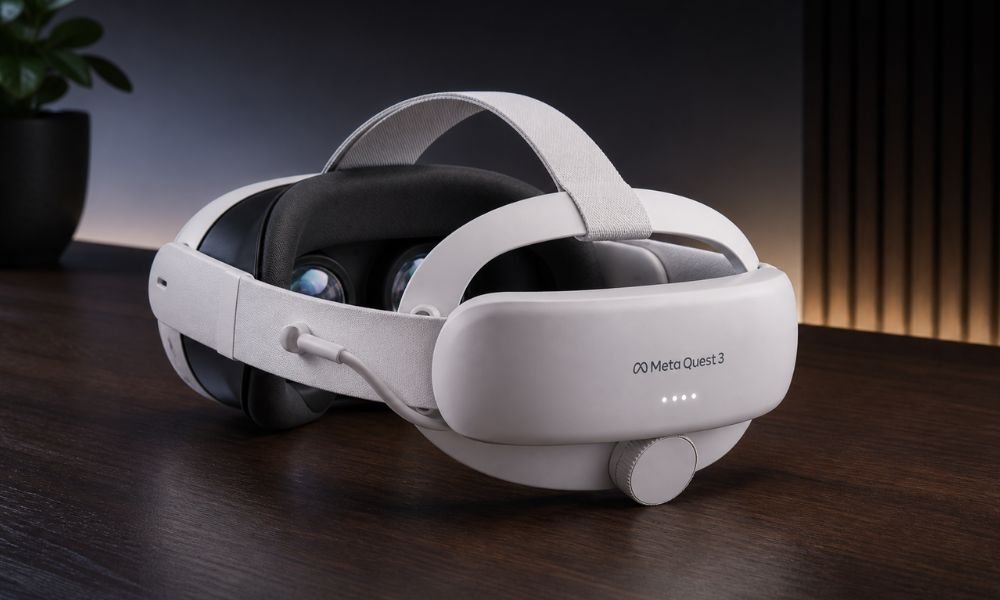
The stock strap is one of the biggest beginner traps.
Many headsets ship with a basic fabric strap to keep the price low.
It works.
But it often pulls the headset into your face.
That creates the “face brick” feeling.
Common symptoms include:
- Cheek pressure
- Forehead strain
- Nose bridge discomfort
- Sinus pressure
- Neck fatigue
The issue is not only weight.
It is balance.
A front-heavy headset pulls forward when you move your head.
That pressure builds during long sessions.
What To Do Instead
Budget for a better strap from day one.
Look for:
- Halo straps
- Elite straps
- Battery straps
A battery strap can improve comfort because the battery sits at the back of your head and works as a counterweight.
Recommended affiliate targets:
- BoboVR S3 Pro
- KIWI Design K4 Boost
- AMVR comfort strap options
A better strap often turns a headset from “I can wear this for 20 minutes” into “I can use this for a full session.”
Mistake 5: Pushing Through Motion Sickness
Do not tough it out.
That is one of the worst VR beginner mistakes.
Motion sickness happens when your eyes and inner ear disagree.
Your eyes see movement.
Your body feels still.
Your brain gets confused.
Early signs include:
- Sweating
- Warm feeling
- Dizziness
- Eye strain
- Stomach discomfort
If you push through it, your brain may start associating VR with nausea.
That can ruin the hobby before it begins.
What To Do Instead
Stop immediately when symptoms start.
Build VR legs slowly.
Start with:
- Stationary games
- Seated experiences
- Teleport movement
- Short 10 to 15 minute sessions
Beginner-friendly games include:
- Beat Saber
- Walkabout Mini Golf
- Moss
- Eleven Table Tennis
Use a fan pointed at your legs or body.
That physical airflow helps your brain stay grounded.
Also use 90Hz or 120Hz refresh rate when possible because smoother motion feels easier on your brain.
Refresh rate is the smoothness of the virtual world.
Low smoothness increases discomfort.
Mistake 6: Ruining Your Lenses With Glasses, Sunlight, or Bad Cleaning
VR lenses are delicate.
Two mistakes can destroy your headset fast:
- Sunlight exposure
- Bad cleaning habits
The lenses inside a VR headset act like magnifying glasses.
If direct sunlight hits them, it can burn permanent marks into the display.
Glasses can also scratch VR lenses.
Tissues and paper towels can create micro-scratches.
Chemical cleaners can damage coatings.
What To Do Instead
Follow simple lens rules:
- Keep the headset away from windows
- Store it in a case
- Use a dry microfiber cloth
- Do not use tissue paper
- Do not use household cleaners
- Use prescription lens inserts if you wear glasses
Recommended affiliate targets:
- Zenni VR prescription inserts
- VR Rock lens inserts
- Hard carrying case
- Microfiber cleaning cloth pack
Lens protection is cheaper than headset replacement.
Mistake 7: Ignoring Hidden PCVR Network Costs
PCVR sounds simple.
You buy a standalone headset.
You connect it to your gaming PC.
You play SteamVR.
That works in theory.
But wireless PCVR depends heavily on your network.
A weak router creates:
- Lag
- Stuttering
- Compression artifacts
- Tracking delay
- Blurry streaming
Many beginners blame the headset.
The real problem is usually Wi-Fi.
What To Do Instead
For wireless PCVR, use:
- Wi-Fi 6E or Wi-Fi 7 router
- Same-room router placement
- Ethernet cable from PC to router
- Dedicated network for the headset
If you do not want network troubleshooting, use a USB-C Link cable instead.
Recommended affiliate targets:
- Wi-Fi 6E router
- Wi-Fi 7 router
- USB-C Link cable
- Virtual Desktop app mention
Wireless PCVR is amazing when set up correctly.
It is frustrating when treated like normal Wi-Fi.
Mistake 8: Expecting VR to Replace Flat-Screen Gaming
VR is not a normal console.
Beginners sometimes expect:
- 100-hour campaigns
- Endless AAA releases
- Traditional controller gaming
- Flat-screen style comfort
VR shines in different ways.
It is strongest for:
- Fitness
- Rhythm games
- Simulation
- Horror
- Social VR
- Short immersive stories
- Racing and flight sims
- Active movement experiences
If you expect VR to replace your Xbox, PlayStation, or PC overnight, you may feel disappointed.
What To Do Instead
Buy VR for specific use cases.
Ask yourself:
- Do I want to move more?
- Do I want immersive fitness?
- Do I want sim racing or flight sims?
- Do I want social games?
- Do I want a private movie screen?
VR is best when you understand what it does differently.
The Hidden Costs of VR: Budget Beyond the Box
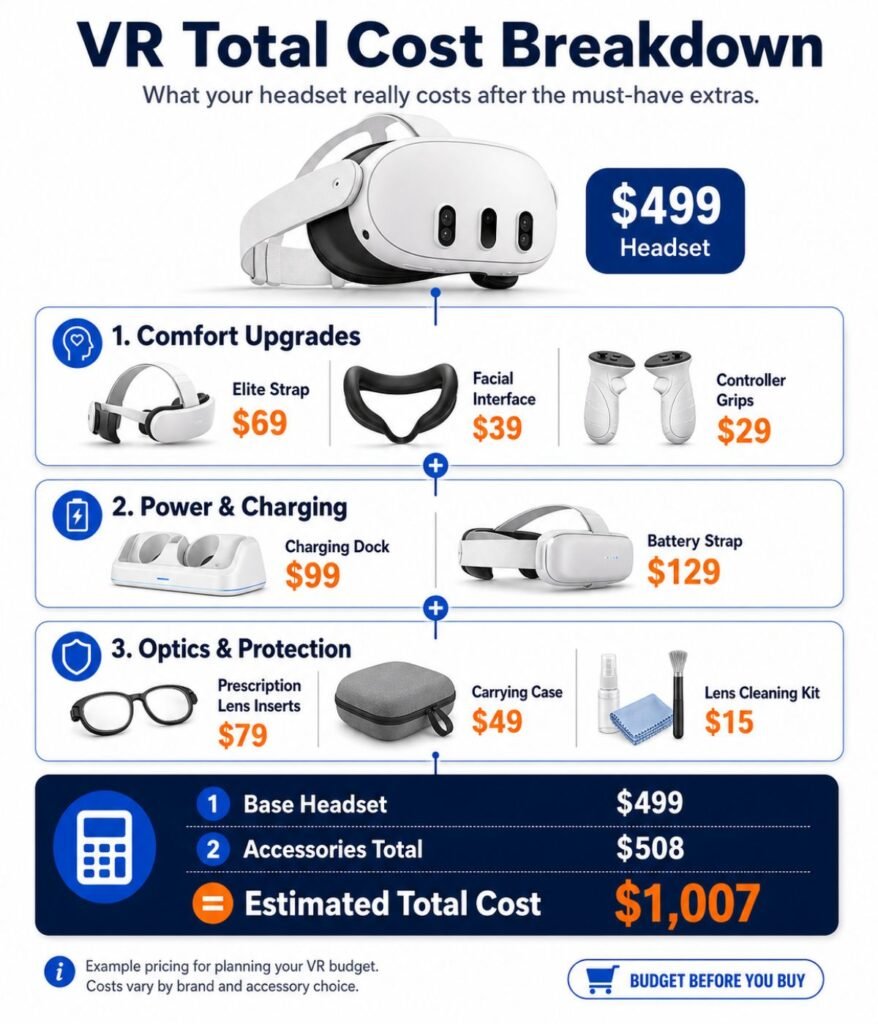
Most headset prices are incomplete.
The real cost includes accessories that improve comfort, battery life, hygiene, and performance.
Common Hidden Costs
| Upgrade | Typical Cost | Why It Matters |
| Battery Head Strap | $50 to $100 | Better comfort and longer sessions |
| Facial Interface | $25 to $40 | Sweat control and hygiene |
| Controller Grips | $20 to $30 | Prevents drops during active games |
| Prescription Inserts | $50 to $100 | Better vision and lens protection |
| Carrying Case | $25 to $50 | Protects headset and lenses |
| Wi-Fi 6E Router | $100 to $200 | Needed for strong wireless PCVR |
| USB-C Link Cable | $25 to $80 | Stable wired PCVR connection |
Realistic Budget Examples
Standalone Beginner Setup
Headset plus strap, case, and facial interface.
Expected extra cost:
$100 to $150.
Wireless PCVR Setup
Headset plus strap, router, cable, and battery solution.
Expected extra cost:
$200 to $350.
That is why a $299 headset rarely stays $299.
You deserve to know the real number before buying.
Product Recommendation Matrix: The 2026 Safe Bets
These are the safer choices based on common beginner needs.
| Buyer Type | Best Headset | Why It Works | Watch Out For |
| Best All-Around | Meta Quest 3 | Pancake lenses, strong ecosystem, mixed reality | Higher price |
| Budget Beginner | Meta Quest 3S | Same processor as Quest 3, lower price | Fresnel lenses |
| PS5 Owner | PlayStation VR2 | OLED visuals and console simplicity | Wired headset |
| PCVR User | Quest 3 or Pico 4 | Good PCVR flexibility | Router or cable setup |
| Media Viewer | Quest 3 or Pico 4 | Better optics for text and movies | App ecosystem differences |
| Fitness User | Quest 3S or Quest 3 | Wireless movement and strong app support | Strap upgrade needed |
Best Overall: Meta Quest 3
Quest 3 is the safest all-around pick.
It avoids many beginner mistakes because it offers:
- Pancake lenses
- Continuous IPD adjustment
- Strong mixed reality
- Standalone and PCVR support
- Large app ecosystem
Best for buyers who want fewer regrets.
Best Budget Pick: Meta Quest 3S
Quest 3S is strong for price-conscious buyers.
It shares the same processor as Quest 3.
That means strong game support.
The compromise is optics.
Fresnel lenses are usable, but less clear.
Best for casual users and first-time testers.
Best for PS5 Owners: PlayStation VR2
PSVR2 works well if you already own a PS5.
Its OLED display creates deep blacks and strong contrast.
The downside is the wire.
Best for console gamers who want plug-and-play VR.
Best Comfort Alternative: Pico 4
Pico 4 has strong comfort and pancake lenses.
Its rear battery balance feels good during long sessions.
The downside is a smaller standalone ecosystem.
Best for PCVR users and media viewers.
Quick Buyer Checklist Before You Purchase
Before buying any VR headset, answer these questions.
- What is my main use case?
- Do I need standalone VR or PCVR?
- Do I have enough play space?
- Do I know my IPD?
- Am I willing to buy a better strap?
- Do I wear glasses?
- Do I need wireless PCVR?
- Do I want fitness, gaming, movies, or productivity?
- Am I okay with shorter VR games?
If you cannot answer these yet, slow down.
Researching now prevents regret later.
FAQ: VR Buying Mistakes Beginners Ask About
What is the biggest VR buying mistake beginners make?
The biggest VR buying mistake is buying based only on price. Beginners often ignore comfort, lens quality, hidden costs, and ecosystem support.
Is Quest 3 better than Quest 3S?
Yes, Quest 3 is better for long-term comfort and clarity because it uses pancake lenses and continuous IPD adjustment. Quest 3S is better for budget buyers.
Do I need a gaming PC for VR?
No. Standalone headsets like Quest 3 and Quest 3S work without a gaming PC. You only need a PC if you want PCVR games like SteamVR titles.
Why does VR look blurry?
VR often looks blurry because of incorrect IPD, poor headset positioning, Fresnel lens limitations, dirty lenses, or low-resolution content.
How do I avoid VR motion sickness?
Start with short sessions, use teleport movement, avoid intense games early, stop at the first sign of nausea, and use a fan for physical grounding.
Are VR accessories necessary?
Not always, but most users benefit from a better strap, facial interface, battery pack, case, and lens protection.
Can sunlight damage a VR headset?
Yes. Direct sunlight can burn permanent spots into the display because VR lenses focus sunlight like magnifying glass lenses.
Should I buy VR in 2026?
Yes, if you know your use case. VR is strong for fitness, gaming, simulation, social experiences, and media viewing. Avoid buying only because of hype.
Final Verdict: Buy Smarter, Not Faster
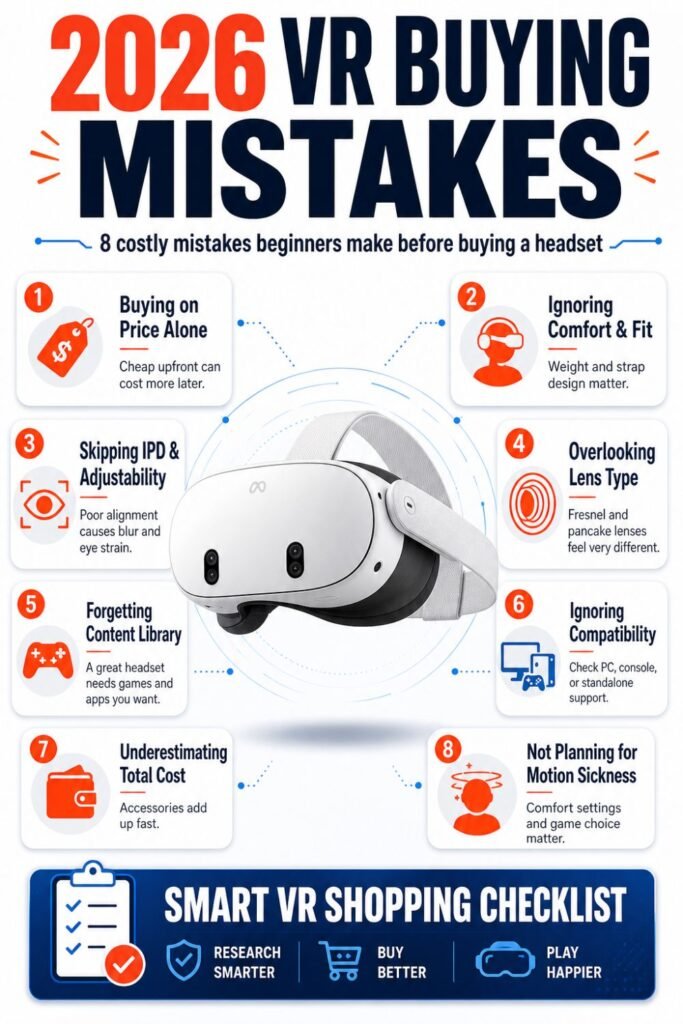
VR buying mistakes are expensive because they do not always show up on day one.
At first, every headset feels exciting.
The real test comes after two weeks.
Does it still feel comfortable?
Do you still want to use it?
Does it fit your room?
Does the image stay clear?
Did you budget for the right accessories?
The smartest VR buyers in 2026 do not chase hype.
They choose based on comfort, clarity, ecosystem, hidden costs, and real use case.
That is how you avoid buyer’s remorse.
And that is how your first VR headset becomes something you use, not something you store.