What to Look for When Buying a VR Headset in 2026
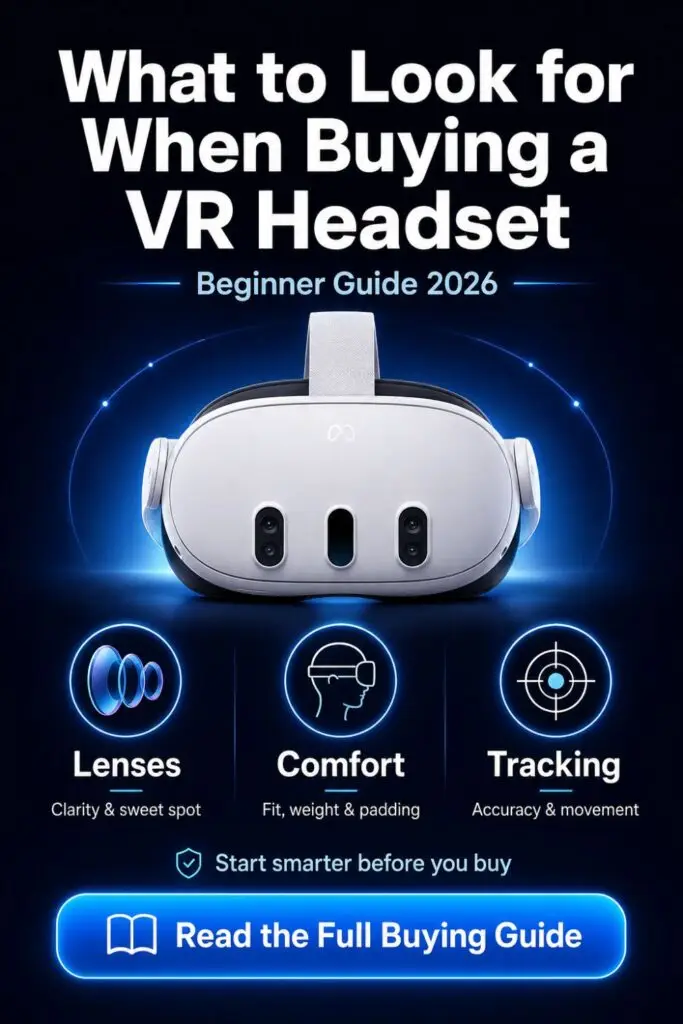
What to look for when buying a VR headset in 2026 comes down to five things: lenses, comfort, tracking, ecosystem, and the real cost after accessories.
Buying your first VR headset should feel exciting.
You are opening the door to immersive games, fitness apps, virtual travel, mixed reality, social worlds, and private movie screens.
But the buying process gets confusing fast.
You see terms like:
- Pancake lenses
- Fresnel lenses
- IPD
- FOV
- 6DoF tracking
- Passthrough
- PCVR
- Refresh rate
- Wi-Fi 6E
- Foveated rendering
That is enough to make anyone pause.
The good news is simple.
You do not need to understand every technical detail to choose the right VR headset.
You need to know which features change the experience in real life.
This guide breaks down what matters, what is hype, what beginners often miss, and which headset makes sense based on your budget and use case.
By the end, you will know how to buy a VR headset without wasting money on the wrong device.
Quick Answer: What Should Beginners Look For?
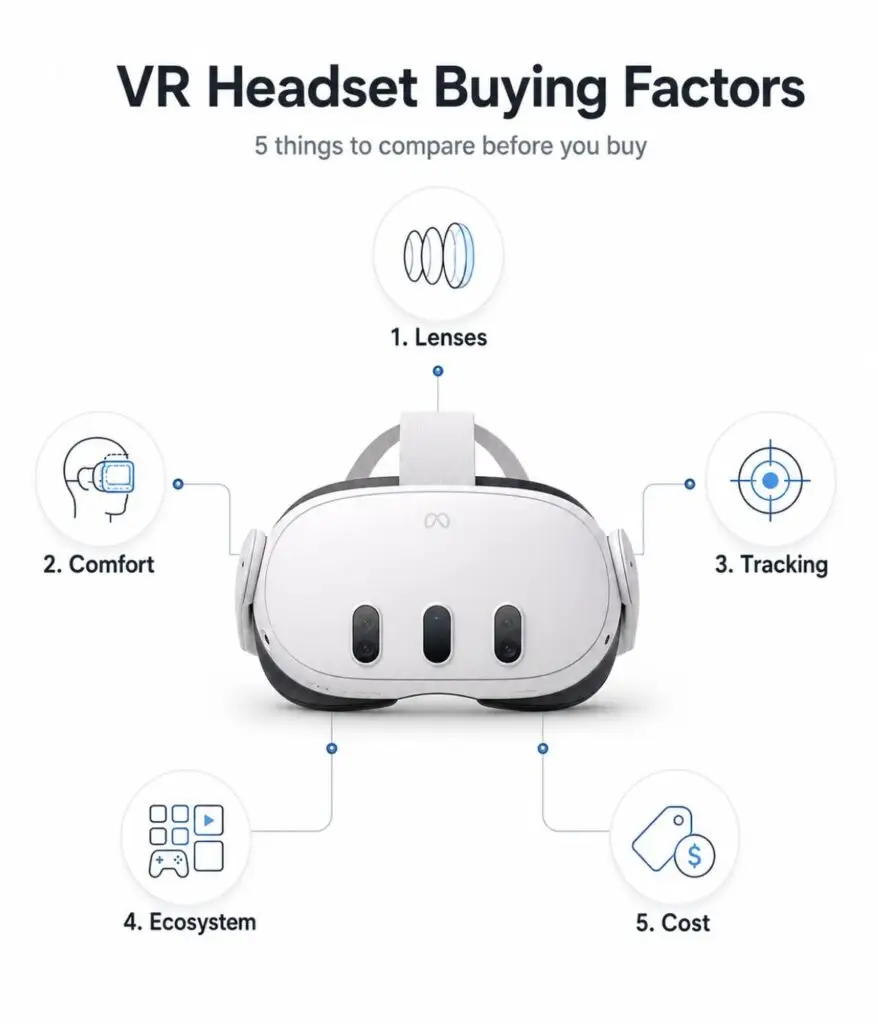
If you are buying your first VR headset, focus on these features first:
| Buying Factor | Why It Matters |
| Lens Type | Controls clarity and eye comfort |
| Comfort | Determines whether you keep using VR |
| Tracking | Keeps movement smooth and accurate |
| Ecosystem | Decides which apps and games you get |
| Setup Type | Standalone, PCVR, or console VR |
| Battery Life | Impacts session length |
| Hidden Costs | Straps, cases, inserts, routers, and cables |
| IPD Adjustment | Prevents blur and eye strain |
The best VR headset is not always the most expensive one.
The best headset is the one that fits your space, body, budget, and reason for buying.
The 5 Core Things to Look for When Buying a VR Headset
Most beginner guides overcomplicate VR.
Let’s simplify the decision.
A good VR headset should pass five tests.
1. Lens Quality: Pancake vs Fresnel Lenses
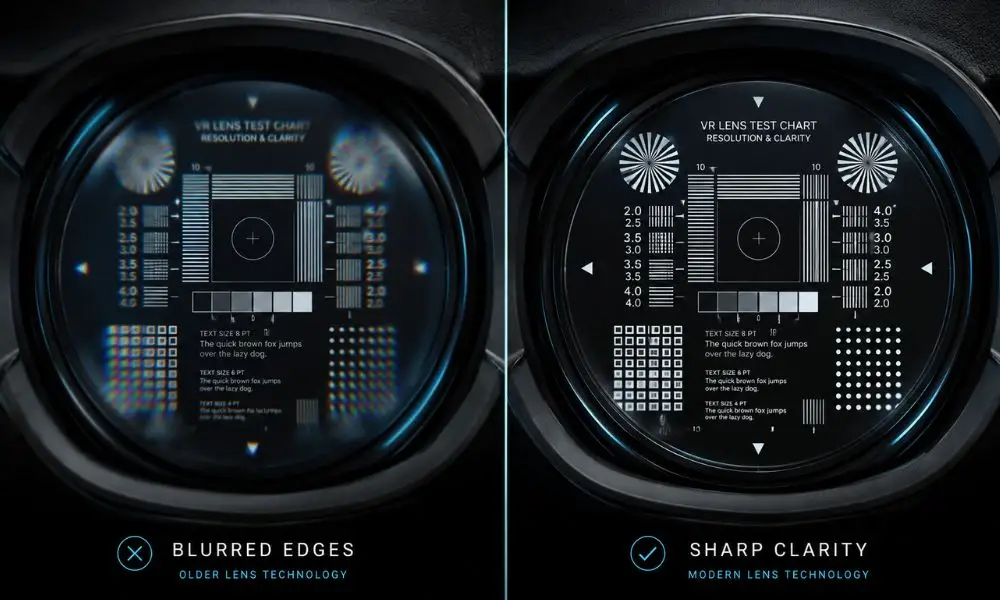
Lens quality is one of the most important things to look for when buying a VR headset.
Many beginners focus on resolution.
Resolution matters.
But lenses decide how clear the image feels to your eyes.
Fresnel Lenses
Fresnel lenses are older and cheaper.
They use visible circular ridges to bend light.
They help keep headset cost lower, but they come with tradeoffs.
Common issues include:
- Smaller sweet spot
- Blurry edges
- More glare
- God rays around bright objects
- More frequent headset adjustment
Fresnel lenses are still usable.
The Meta Quest 3S and PSVR2 both use Fresnel lenses.
But they require more care with positioning.
If the headset shifts on your face, the image may look blurry.
Pancake Lenses
Pancake lenses are newer and clearer.
They fold light through a thinner optical path, which allows the headset to feel slimmer and better balanced.
Benefits include:
- Larger sweet spot
- Better edge clarity
- Less glare
- Thinner headset design
- Better text readability
- Less eye strain during long sessions
Meta Quest 3 uses pancake lenses.
That is one reason many buyers choose it over Quest 3S.
Beginner Rule
Choose pancake lenses if your budget allows.
Choose Fresnel lenses if price matters more than clarity.
If you plan to use VR for movies, productivity, PCVR, or reading text, pancake lenses are worth the upgrade.
2. IPD Adjustment: Why Your Eyes Matter
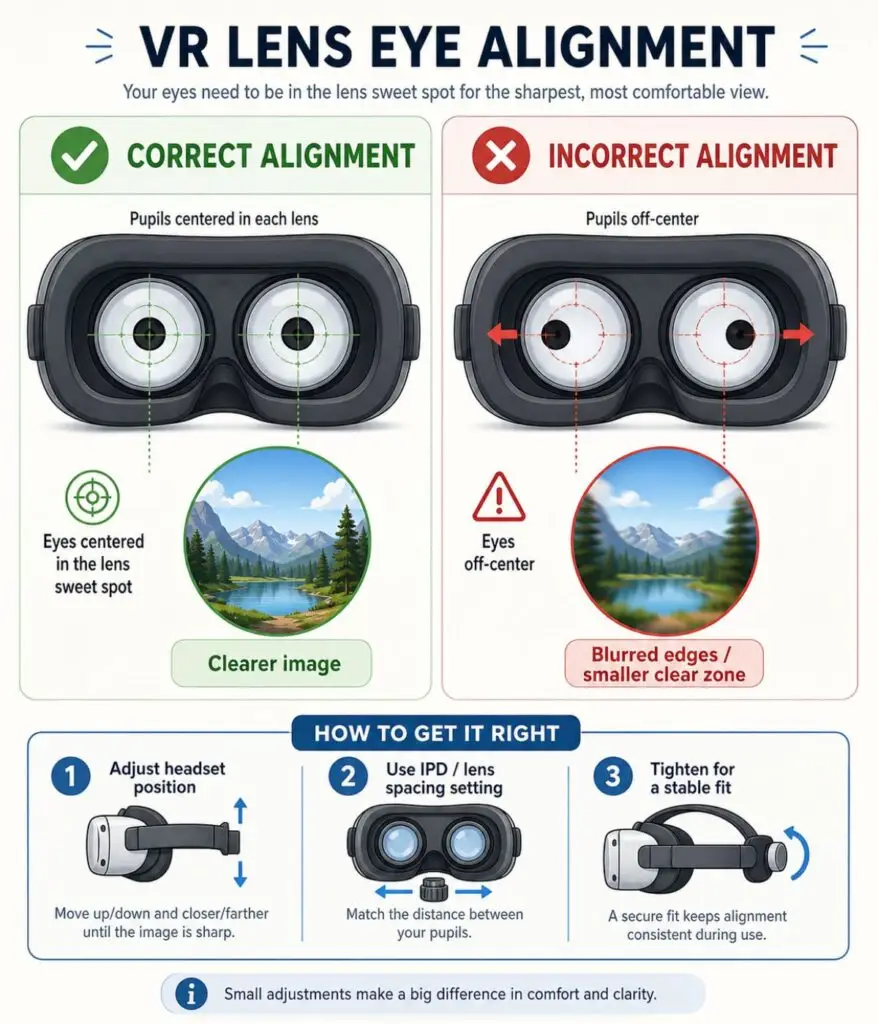
IPD stands for interpupillary distance.
That means the distance between your pupils.
If the lenses do not line up with your eyes, VR may look blurry even on a good headset.
Poor IPD fit may cause:
- Headaches
- Eye strain
- Blurry visuals
- Motion sickness
- Difficulty focusing
Some headsets use a continuous IPD dial.
Others use fixed positions.
Continuous adjustment is better because it lets you match your eye spacing more accurately.
What To Do Before Buying
Measure your IPD first.
You can use:
- A free smartphone app
- An eye exam measurement
- A mirror and ruler method
Then check the headset’s IPD range.
Beginner Rule
If your IPD falls outside average ranges, choose a headset with continuous IPD adjustment.
Quest 3 gives more flexibility than Quest 3S.
3. Comfort and Weight Distribution
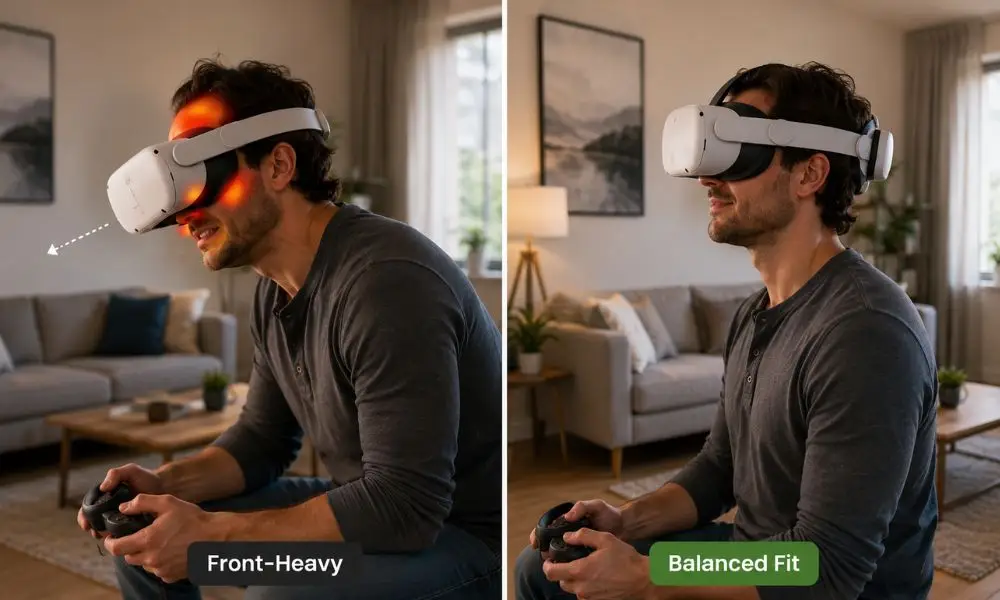
Comfort determines whether your VR headset becomes part of your routine or ends up on a shelf.
Raw weight does not tell the whole story.
Weight distribution matters more.
A headset with poor balance feels heavy because it pulls forward on your face.
This creates pressure on:
- Cheeks
- Forehead
- Nose bridge
- Sinuses
- Neck
This is why some beginners enjoy VR for a few days, then stop using it.
The headset may work fine.
The comfort does not.
What Makes a Headset Comfortable?
Look for:
- Balanced weight
- Good strap support
- Breathable facial interface
- Adjustable fit
- Room for glasses or lens inserts
- Less pressure on the front of the face
The Stock Strap Problem
Many headsets ship with a basic fabric strap.
That keeps the price low, but it rarely delivers the best comfort.
A rigid halo strap or battery strap usually improves the headset immediately.
Beginner Rule
Budget for a better strap from day one.
Recommended upgrade categories:
- Halo strap
- Elite strap
- Battery head strap
- Ventilated facial interface
Affiliate placement idea:
Compare comfort straps from BoboVR, KIWI Design, and AMVR inside this section.
4. Tracking: 3DoF vs 6DoF Explained Simply
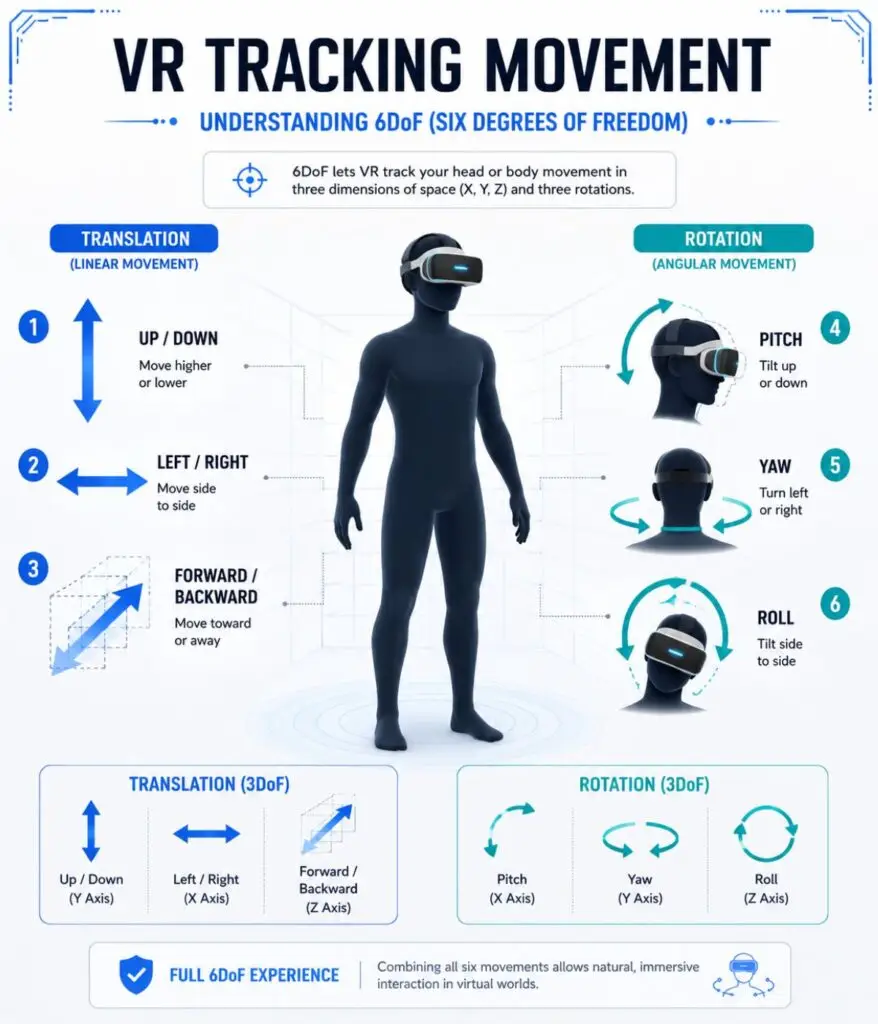
Tracking controls how your movement appears in VR.
The most important term is 6DoF.
That means six degrees of freedom.
A 6DoF headset tracks:
- Looking left and right
- Looking up and down
- Tilting your head
- Moving forward
- Moving backward
- Leaning, crouching, and walking around
Older 3DoF headsets only tracked head rotation.
They did not track body movement through space.
For modern VR, 6DoF is the standard.
Beginner Rule
Do not buy a VR headset without 6DoF tracking.
For gaming, fitness, social VR, and room-scale experiences, 6DoF is non-negotiable.
5. Ecosystem: Standalone vs PCVR vs Console VR
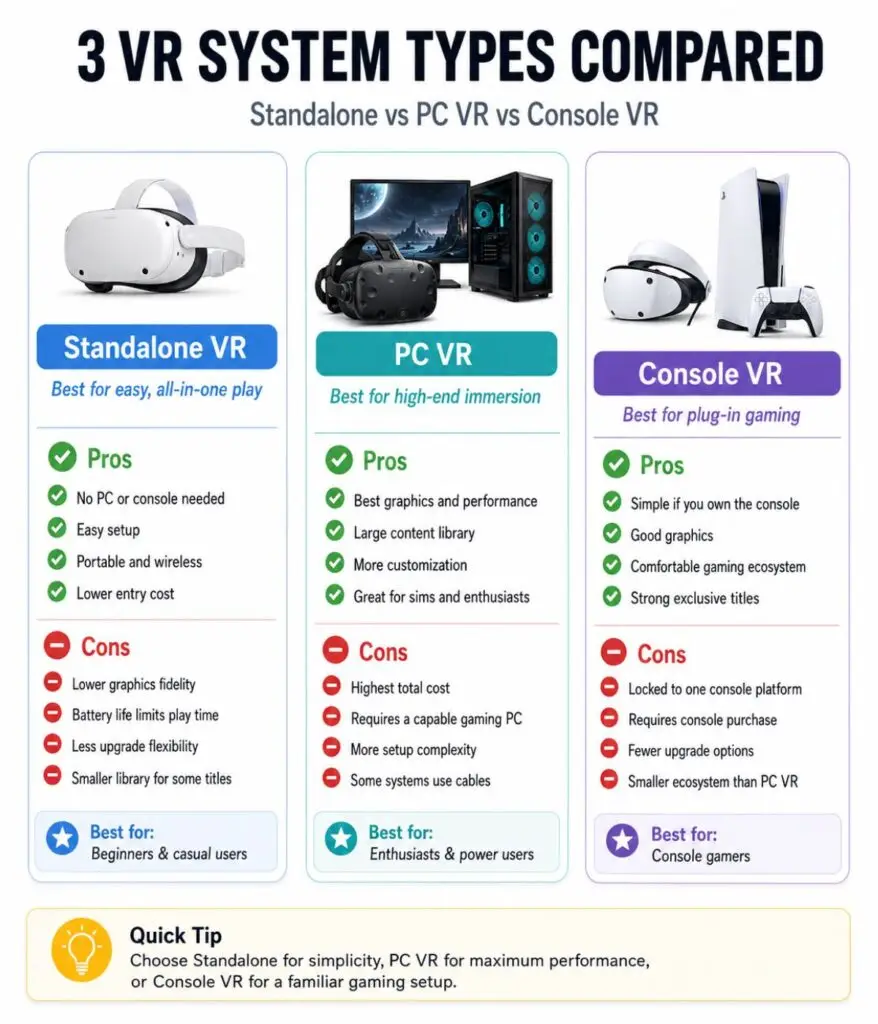
The headset ecosystem matters because it decides what you can play and how much setup you need.
There are three main VR paths.
Standalone VR
Standalone headsets include the processor, battery, tracking, and displays inside the headset.
You do not need a gaming PC or console.
Popular examples:
- Meta Quest 3
- Meta Quest 3S
- Pico 4 Ultra
Standalone VR is best for most beginners because it is simple.
Benefits:
- Wireless freedom
- Easy setup
- Lower entry cost
- No PC required
- Good app ecosystem
Tradeoffs:
- Shorter battery life
- Lower graphics than PCVR
- Mobile-level hardware limits
PCVR
PCVR uses a gaming computer to power the VR experience.
The headset acts as your display and tracking system.
PCVR delivers stronger graphics and access to SteamVR.
Benefits:
- Better graphics
- Large Steam library
- Sim racing and flight sim support
- Modding potential
Tradeoffs:
- Gaming PC required
- More setup work
- Cables or Wi-Fi tuning
- Higher total cost
Console VR
Console VR connects to a game console.
The main option is PlayStation VR2 for PS5.
Benefits:
- Console simplicity
- Strong gaming visuals
- OLED display
- Good haptics
Tradeoffs:
- Requires PS5
- Wired setup
- Smaller non-gaming ecosystem
Beginner Rule
For 90% of first-time buyers, standalone VR is the easiest starting point.
PCVR is better after you know you enjoy VR and already have a capable gaming PC.
Meta Quest 3 vs Quest 3S: The Beginner Decision
For most beginners, the buying decision comes down to Quest 3 vs Quest 3S.
Both headsets use the same Snapdragon XR2 Gen 2 processor.
That means both run the same Quest games.
The difference is not power.
The difference is comfort, lenses, storage, field of view, and long-term experience.
Quest 3S: Best Budget Entry
Quest 3S is the lower-cost option.
It works well for:
- First-time buyers
- Kids and teens
- Casual gamers
- Fitness users
- Budget-focused buyers
Strengths:
- Lower price
- Same processor as Quest 3
- Strong app library
- Full-color passthrough
- Easy standalone setup
Tradeoffs:
- Fresnel lenses
- Lower resolution
- Smaller sweet spot
- More front-heavy feel
- Less flexible IPD
Quest 3: Best Long-Term Pick
Quest 3 is the better headset overall.
It works best for:
- Adults buying for long-term use
- Movie watching
- PCVR
- Productivity
- Text reading
- Mixed reality exploration
- Users sensitive to blur
Strengths:
- Pancake lenses
- Higher resolution
- Better field of view
- Continuous IPD adjustment
- Slimmer profile
- Better long-session comfort
Tradeoffs:
- Higher price
- Battery life still limited
- Comfort strap upgrade still recommended
Simple Recommendation
Choose Quest 3S if you want the cheapest safe way into VR.
Choose Quest 3 if you want better clarity, better comfort, and stronger long-term value.
PCVR Requirements: What Beginners Should Know
You do not need a PC for Quest 3 or Quest 3S.
But if you want high-end SteamVR games, your PC matters.
VR is harder to run than normal flat-screen gaming because your PC renders two images at once, one for each eye.
Beginner PCVR Baseline
Look for:
| Part | Beginner Recommendation |
| GPU | RTX 3060 / RTX 4060 or better |
| RAM | 16GB minimum |
| CPU | Modern Intel i5/i7 or Ryzen 5/7 |
| Connection | USB-C Link cable or Wi-Fi 6E |
| Router | Same-room placement for wireless PCVR |
Wireless PCVR Tip
Wi-Fi matters.
For smoother wireless PCVR, connect your PC to the router with Ethernet.
Then connect the headset to a strong 5GHz or 6GHz network.
If your router is weak, PCVR may stutter even if your headset is good.
Affiliate placement idea:
Add product links for USB-C Link cables and Wi-Fi 6E routers inside this section.
Motion Sickness: How Beginners Build VR Legs
Motion sickness is one of the biggest concerns for new VR users.
It happens when your eyes see movement, but your inner ear feels your body standing still.
This mismatch creates discomfort.
Common symptoms include:
- Dizziness
- Sweating
- Nausea
- Eye strain
- Headache
- Fatigue
What Beginners Should Do
Start slow.
Use short sessions.
Do not begin with flying games, rollercoasters, or fast smooth movement.
Start with:
- Seated experiences
- Stationary games
- Teleport movement
- Slow exploration apps
Beginner-friendly choices:
- Beat Saber
- Walkabout Mini Golf
- Moss
- Wander
- Eleven Table Tennis
The Stop Rule
Stop at the first sign of discomfort.
Do not push through nausea.
That teaches your brain to associate VR with sickness.
Helpful Comfort Tricks
- Use a fan pointed at you
- Play in short sessions
- Use snap turning
- Enable vignettes
- Use 90Hz or 120Hz modes when available
- Sit in a swivel chair for early sessions
Refresh rate is the smoothness of the virtual world.
Higher smoothness helps reduce visual discomfort.
Setup and Safety: Do This Before Your First Session
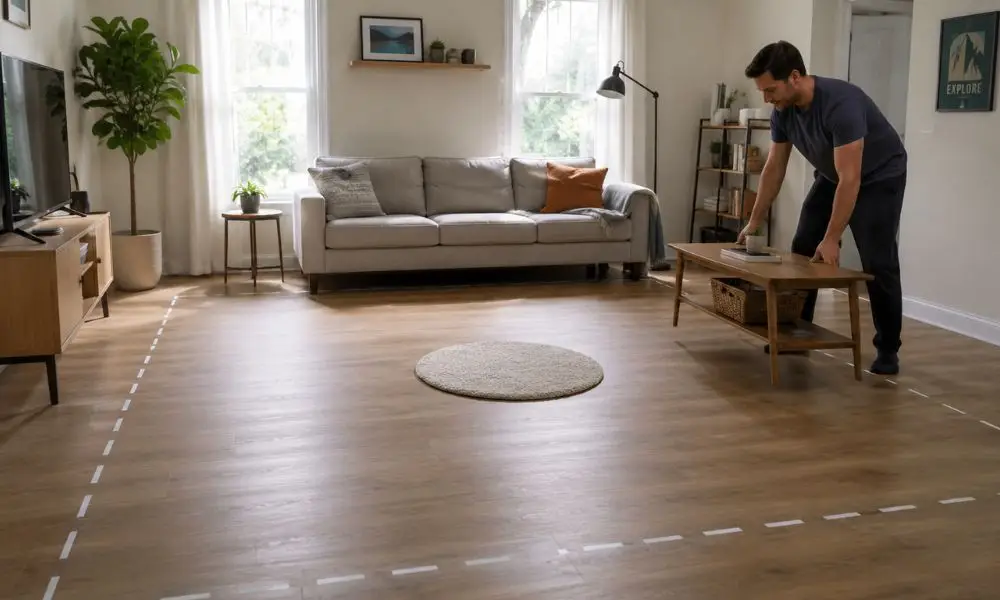
A good first session starts with a safe room.
Clear the space before wearing the headset.
Beginner Setup Checklist
- Move coffee tables
- Clear cables
- Keep pets away
- Check ceiling fans
- Remove fragile items
- Use good lighting
- Avoid direct sunlight
- Set a safe boundary
- Use wrist straps
- Keep drinks away from play space
Space Needed
For seated VR:
A chair and arm room is enough.
For room-scale VR:
Aim for about 6.5 feet by 6.5 feet or more.
The Small Rug Trick
Place a small rug in the centre of your play area.
When your feet leave the rug, you know you are drifting.
This simple trick prevents wall punches and TV accidents.
Hidden Costs: What the Box Does Not Tell You
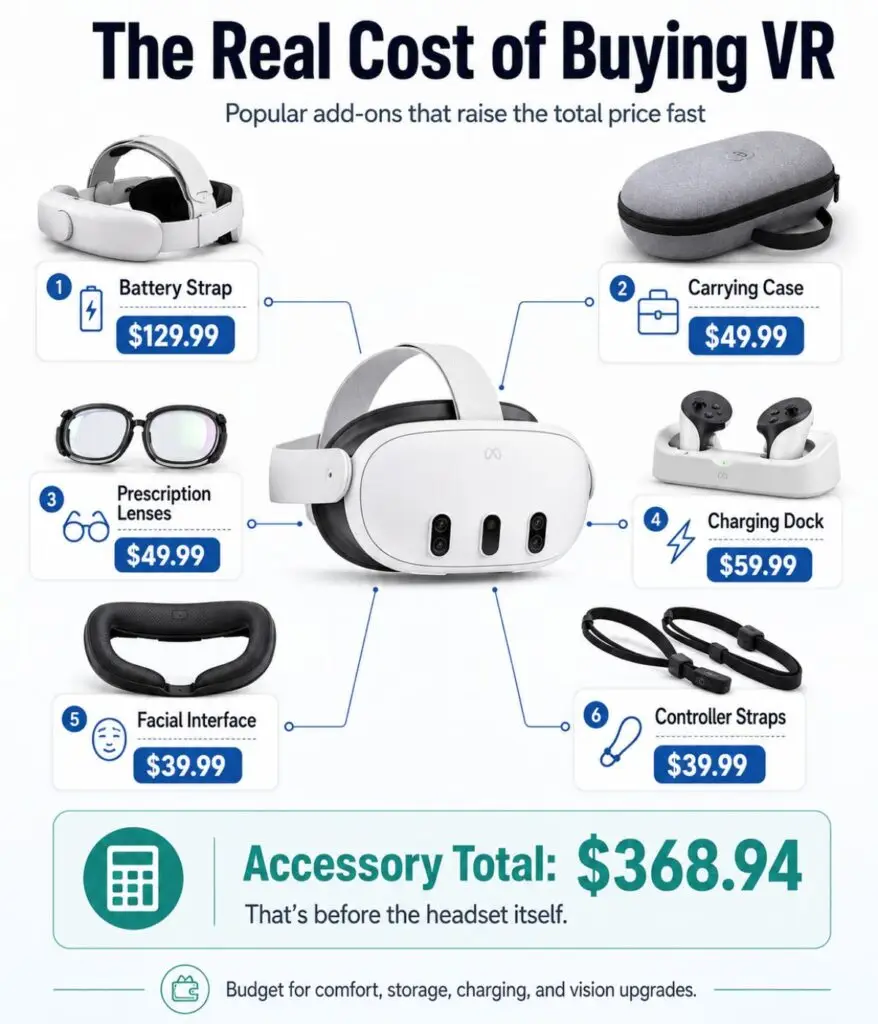
The headset price is only the starting point.
Most beginners eventually buy accessories.
Common Extra Costs
| Accessory | Typical Cost | Why You Need It |
| Better Head Strap | $40 to $100 | Comfort and balance |
| Battery Strap | $60 to $130 | Longer play sessions |
| Facial Interface | $25 to $50 | Sweat control and hygiene |
| Carry Case | $25 to $60 | Lens and travel protection |
| Prescription Inserts | $50 to $100 | Better comfort for glasses wearers |
| Controller Grips | $20 to $40 | Better hold during active games |
| Link Cable | $25 to $80 | Wired PCVR |
| Wi-Fi 6E Router | $100 to $200 | Wireless PCVR |
A $299 headset may turn into a $400 to $500 setup.
That is normal.
It is better to plan for it than feel surprised later.
Essential Accessories Worth Buying First
Do not buy every accessory at once.
Start with the upgrades that solve real problems.
1. Better Head Strap
This is the first upgrade most users should make.
It improves balance and reduces face pressure.
Good targets:
- BoboVR S3 Pro
- KIWI Design K4 Duo
- AMVR head strap options
2. Facial Interface
The stock foam absorbs sweat.
A silicone or PU leather interface is easier to clean.
Good targets:
- AMVR ventilation facial interface
- KIWI facial interface
- VR Cover options
3. Prescription Lens Inserts
If you wear glasses, this upgrade protects your headset and improves comfort.
Good targets:
- Zenni VR inserts
- VR Wave inserts
- VR Rock inserts
4. Charging Dock or Battery Strap
Standalone headsets have limited battery life.
Charging docks keep everything ready.
Battery straps extend sessions.
Good targets:
- PrismXR charging dock
- YOGES charging station
- BoboVR battery ecosystem
Best VR Headsets for Different Beginner Types
Best Overall Beginner Headset: Meta Quest 3
Quest 3 is the safest long-term recommendation for most adults.
Why it works:
- Clear pancake lenses
- Strong app library
- Standalone and PCVR support
- Better mixed reality
- Good long-term value
Best Budget Headset: Meta Quest 3S
Quest 3S is the best entry point if price matters most.
Why it works:
- Lower cost
- Same processor as Quest 3
- Same Quest game library
- Beginner-friendly setup
Best for PS5 Owners: PlayStation VR2
PSVR2 makes sense if you already own a PS5 and want console VR.
Why it works:
- OLED display
- Strong haptics
- Plug-and-play console setup
- Great for Gran Turismo and PSVR titles
Best Meta Alternative: Pico 4 Ultra
Pico 4 Ultra works well for users who prefer comfort and PCVR streaming.
Why it works:
- Good weight balance
- Pancake lenses
- Strong PCVR potential
- Meta alternative ecosystem
Common Beginner Buying Mistakes
Avoid these before checkout.
Mistake 1: Buying Only by Price
The cheapest headset may cost more after accessories.
Mistake 2: Ignoring Lens Type
Fresnel lenses save money but reduce clarity.
Mistake 3: Forgetting IPD
Wrong lens alignment leads to blur and headaches.
Mistake 4: Expecting PCVR Without PCVR Hardware
A weak PC or router ruins the experience.
Mistake 5: Skipping Comfort Accessories
Stock straps rarely provide the best fit.
Mistake 6: Starting With Intense Games
This increases motion sickness risk.
Mistake 7: Storing the Headset Near Sunlight
Sunlight through VR lenses may damage the display.
Mistake 8: Expecting VR to Replace Every Game Type
VR works best when matched to specific use cases.
FAQ: What to Look for When Buying a VR Headset
What is the most important thing to look for when buying a VR headset?
The most important thing to look for when buying a VR headset is the balance between lens quality, comfort, tracking, and ecosystem. Clear lenses and good comfort matter more than raw specs alone.
Is Quest 3 or Quest 3S better for beginners?
Quest 3S is better for strict budgets, while Quest 3 is better for long-term clarity and comfort. Quest 3 is the better headset, but Quest 3S is the better low-risk entry point.
Do I need a gaming PC for VR?
No. Standalone headsets like Meta Quest 3 and Quest 3S work without a gaming PC. A PC is only needed for high-end PCVR games.
What are pancake lenses in VR?
Pancake lenses are newer VR lenses that provide better edge clarity, a larger sweet spot, and a slimmer headset design compared with older Fresnel lenses.
Why does VR make some people sick?
VR motion sickness happens when your eyes see movement but your inner ear feels your body standing still. Start with short, stationary sessions and stop at the first sign of discomfort.
How much space do I need for VR?
Seated VR needs only chair space. Room-scale VR works best with around 6.5 feet by 6.5 feet of clear space.
Can I wear glasses in a VR headset?
Yes, but prescription lens inserts are better. Glasses may scratch VR lenses and feel uncomfortable during long sessions.
What accessories should I buy first?
Start with a better head strap, facial interface, carrying case, and prescription lens inserts if you wear glasses.
Final Verdict: Buy for Fit, Not Hype
What to look for when buying a VR headset is not about chasing the biggest number on a spec sheet.
It is about buying the headset that fits your eyes, room, comfort needs, budget, and content goals.
For most beginners, standalone VR is the right starting point.
Quest 3S gives you the lowest safe entry into modern VR.
Quest 3 gives you the better long-term experience.
PSVR2 fits PS5 owners.
Pico 4 Ultra fits users who want a Meta alternative and better comfort balance.
Buy based on fit.
Not hype.
That is how your first VR headset becomes something you use, not something that collects dust.